A clamp meter measures current by clamping its jaws around a wire. You don't need to cut the wire or put the meter in the circuit. For 12V and solar systems, where currents are often too big for a normal multimeter, that's a huge help.
There's a catch, though. Many clamp meters can only measure AC current. On a DC circuit they'll read zero, or nonsense. This lesson shows how to tell which kind you have and how to use a DC clamp meter properly.
1. Why use a clamp meter?
A normal multimeter measures current in series: you break the circuit and the current flows through the meter. That's fine for small currents, but most multimeters' current inputs are limited, often to 10A and sometimes only for a short time. See How to Use a Multimeter Safely.
A clamp meter measures the magnetic field around the wire instead. No breaking the circuit, and much higher currents.
2. AC-only or DC? Check before you buy or use one
- AC-only clamp meters use a design that only responds to changing (alternating) current. They can't see steady DC.
- DC-capable clamp meters use a different sensor (often called a Hall effect sensor) that can measure both DC and AC.
How to tell:
- Look on the dial and in the specification for DC amps, shown as A with a straight line (and sometimes a dashed line underneath), or as "DCA" or "AC/DC A".
- If the only amps setting has a wavy line (~), it's AC only.
- Check the manual's specification table. It lists the DC current ranges if it has them.
3. Zero it first
DC clamp meters can show a small reading with no wire in the jaws, from the earth's magnetic field, nearby steel or the sensor drifting. Many have a zero button (sometimes labelled "ZERO", "DCA ZERO" or "REL").
- Set the meter to DC amps.
- Close the jaws with no wire inside, held in the same position you'll measure in.
- Press zero. The display should read 0.
- Then clamp the wire.
Check your meter's manual. Some zero automatically, some need it every time, and some have no zero button.
4. Clamp one wire only
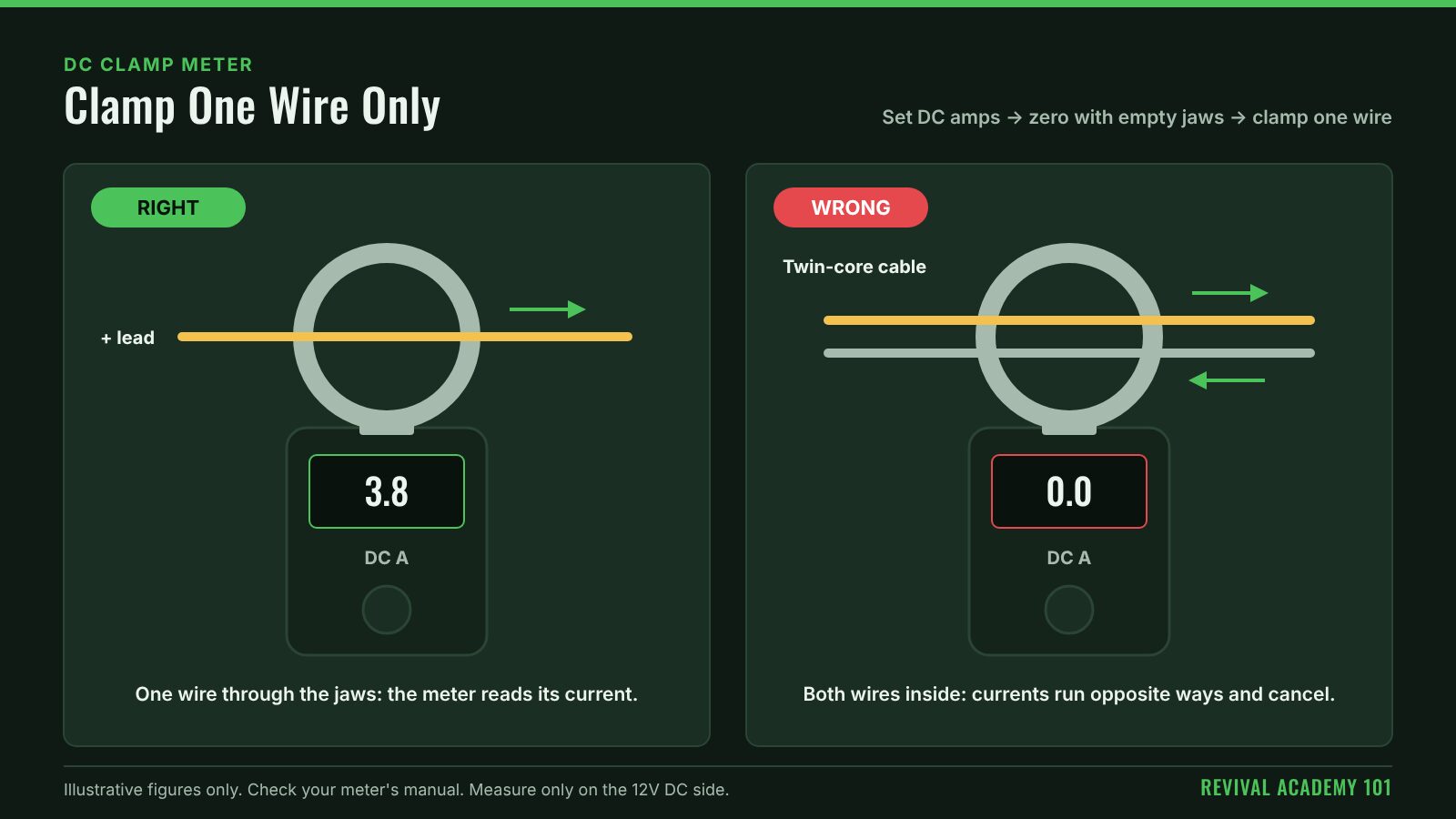
This is the most common mistake. The meter measures the total current through its jaws.
- Clamp around the positive wire or the negative wire, not both.
- If you clamp a twin-core cable with both conductors inside the jaws, the currents go in opposite directions and cancel out. You'll read about zero.
- Close the jaws fully and keep the wire roughly in the middle.
5. Direction and the minus sign
DC flows one way. Most DC clamp meters show a minus sign if the current is flowing the opposite way to the arrow on the jaw. That's useful:
- On a battery's main lead, the sign can tell you whether the battery is charging or discharging.
- If you get a minus sign you didn't expect, check which way the jaw arrow faces.
6. Worked example: what's the fridge drawing?
Illustrative figures only, not a reading from any real fridge.
- Set the meter to DC amps. Close the empty jaws and press zero.
- Clamp the fridge's positive lead alone, with the compressor running.
- The meter reads 3.8A.
- At about 12.8V, that's 12.8 × 3.8 ≈ 49W while the compressor runs.
- Clamp it again when the compressor's off. It reads 0.1A, the standby draw of the fridge's electronics.
With a battery monitor, you can see the same thing over a whole day. The clamp meter is the quick spot-check.
7. Accuracy at small currents
Clamp meters are less accurate at small currents than a multimeter in series. Read the specification: accuracy is usually given as a percentage plus a few counts, and a clamp rated for hundreds of amps may not resolve a fraction of an amp well.
- For big currents (inverters, chargers, winches, starter motors), a clamp meter is ideal.
- For tiny currents (standby drain of a few milliamps), use a multimeter in series, or a clamp meter designed for low currents.
8. Common beginner mistakes
- Using an AC-only clamp meter on a DC circuit and reading zero.
- Forgetting to zero a DC clamp meter.
- Clamping both wires together.
- Expecting high accuracy at very small currents.
- Ignoring the jaw size and the meter's maximum current.
9. Safety boundaries
- Check the meter's CAT rating and voltage rating suit what you're testing near, and check the meter and jaws for damage before use.
- The clamp doesn't touch the conductor, but your hands may be near live terminals. Keep clear of battery terminals and bare metal.
- High-current DC circuits can deliver huge fault currents. Don't remove insulation or open connections to make room for the jaws.
- Measuring current on 240V AC mains circuits inside switchboards is hazardous. In Australia, work on household mains wiring and switchboards must be carried out by a licensed electrician.
10. The main lesson
Check it says DC amps. Zero it. Clamp one wire. Watch the sign. Use it for big currents, and a multimeter for tiny ones.
Continue learning
Revival Academy 101 shares practical tutorials to help you understand electrical systems and make informed decisions.
Explore related Bush & Bench projects:
- BENCH — Cordless Revival: cordless tool batteries and workshop equipment.
- BUSH — Wired For The Wild: vehicle, camping and 12V power.
- HOMESTEAD — Home & Workshop Solar: solar, battery storage and off-grid systems.
Disclosure: Some pages may contain affiliate links. Where applicable, purchases through these links may earn us a commission at no additional cost to you.
Technical note: This is general educational information, not a substitute for a design calculation, manufacturer instructions or applicable Australian standards.